

Businesses today rarely publish content on just one website. The same product information, article, image, or campaign may need to appear across websites, mobile apps, e-commerce platforms, digital kiosks, or other connected experiences. Managing all these touchpoints efficiently requires a content architecture that is flexible enough to work across different technologies.
This is where a headless CMS comes in. But what is headless CMS technology, and why are businesses moving away from traditional content management systems? A headless content management system separates content management from the presentation layer, allowing businesses to manage content centrally and deliver it through APIs to different digital experiences.
What Is a Headless CMS?
Headless CMS Definition
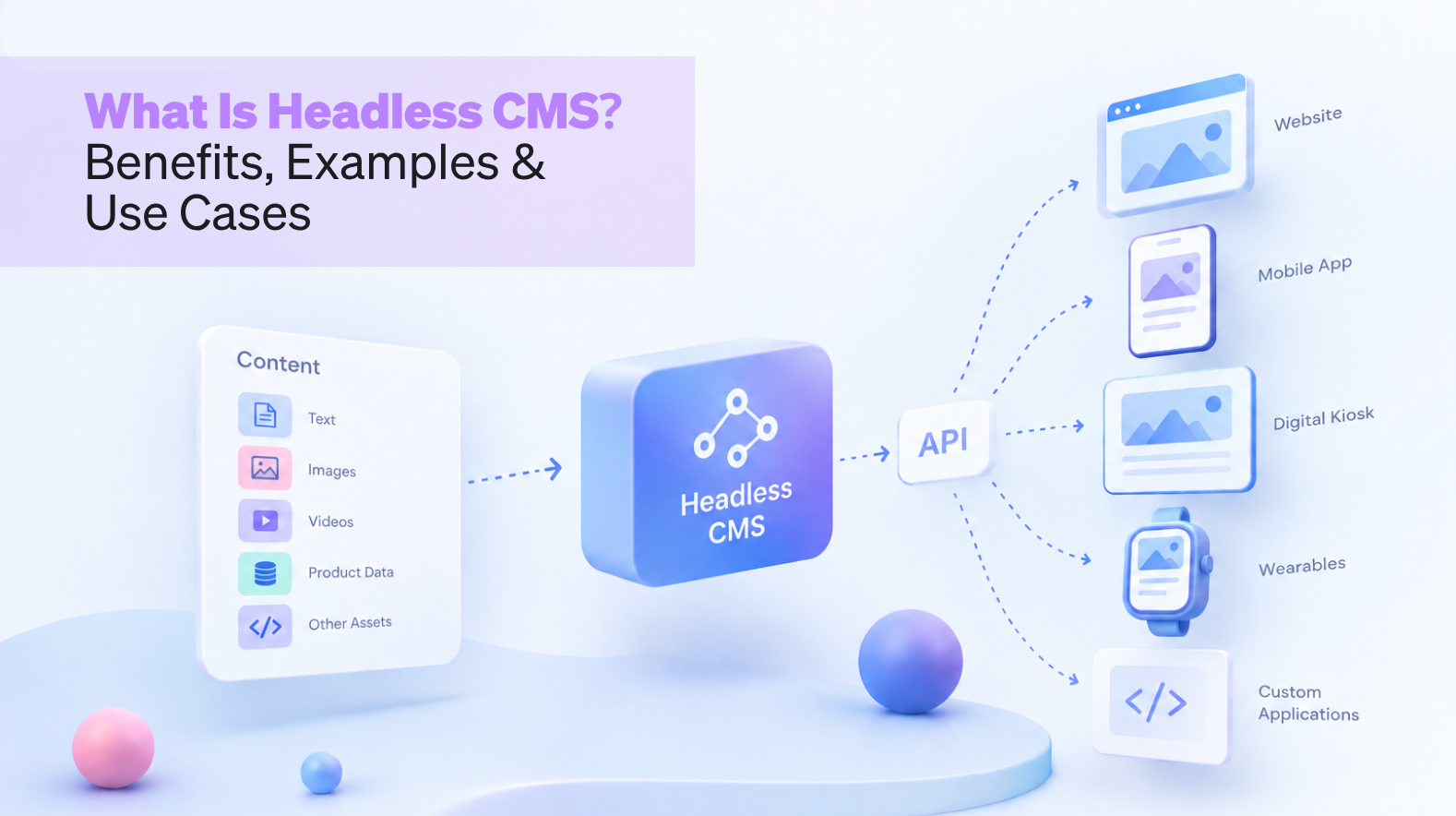
A headless CMS is a content management system where the backend used to create and manage content is separated from the frontend responsible for displaying it.
In simple terms, the CMS stores structured content, while developers decide where and how that content appears. APIs connect the content repository with websites, apps and other digital interfaces.
This separation is the foundation of headless CMS architecture. Instead of tying content to one presentation layer, businesses can reuse the same content across multiple platforms.

How Does a Headless CMS Work?
The basic headless CMS architecture consists of three parts: the content repository, APIs and frontend applications.
Content teams create and organise structured content in the CMS. The system then makes that content available through APIs, commonly REST or GraphQL. Developers can retrieve the required information and display it through a website, mobile app, e-commerce interface or another digital product.
An API-first CMS follows this approach by making content and functionality accessible programmatically. This gives development teams greater freedom over the frontend experience.
Headless CMS vs Traditional CMS
The biggest difference between headless CMS vs traditional CMS lies in how tightly content is connected to presentation.
A traditional CMS can be practical when a business primarily needs a website and wants an integrated content and publishing experience. A headless CMS, on the other hand, becomes useful when content needs to travel across several platforms or when the business requires greater frontend flexibility.
With a headless system, the same content can support multiple interfaces without rebuilding the content itself for every channel.
Key Features of a Headless CMS
A modern headless CMS typically includes:
- Structured and reusable content
- REST or GraphQL APIs
- Content modelling
- Multi-channel content delivery
- Role-based access and workflows
- Integration capabilities
- Support for different frontend frameworks
- Scalability for growing content and digital experiences
These capabilities make a headless content management system particularly relevant to organisations building interconnected digital products.
Benefits of a Headless CMS for Businesses
The most important headless CMS benefits come from separating content from presentation.
Greater frontend flexibility: Developers can choose frameworks and technologies based on the product rather than being restricted by the CMS frontend.
Omnichannel content delivery: A single content source can serve websites, apps and other digital touchpoints.
Content reuse: Teams can create content once and reuse it across experiences, reducing duplication.
Scalability: As new digital channels are introduced, businesses can connect them to the same content infrastructure instead of rebuilding the entire CMS.
Better experience design: Since the frontend is independent, designers and developers have more freedom to create interfaces around user needs and business objectives.
These headless CMS benefits become particularly valuable when UX is a strategic priority. Separating the content layer allows teams to design digital experiences around actual user journeys rather than forcing those journeys into the limitations of a predefined CMS template.
Popular Headless CMS Use Cases
There are several practical headless CMS use cases across industries.
E-commerce businesses can use headless systems to deliver product information across online stores, mobile applications and other commerce touchpoints.
Media companies can manage articles, videos and other assets centrally while distributing them across websites and applications.
Large enterprises can use a headless content management system to maintain consistent brand and product information across multiple digital properties.
It can also support corporate websites, financial platforms, educational products, travel applications, digital kiosks and IoT-connected experiences.
Common headless CMS examples include Contentful, Strapi, Sanity and other API-driven platforms. Contentful CMS is one of the recognised examples of this model, offering APIs that allow structured content to be delivered to different digital experiences.
A Contentful headless CMS setup can therefore separate content operations from the frontend technology, allowing development teams to build experiences using their preferred frameworks.
Challenges of Using a Headless CMS
A headless architecture is not automatically the right choice for every business.
First, it can require greater development involvement because the CMS does not provide the complete frontend experience. Teams may also need to manage additional integrations, APIs, hosting infrastructure and development workflows.
Content modelling requires planning as well. Poorly structured content can create problems when the same information needs to be reused across different channels.
There can also be a learning curve for teams moving from a traditional CMS to an API-driven workflow.
Is a Headless CMS Right for Your Business?
The answer depends on your digital ecosystem rather than the size of your company alone.
A headless CMS may make sense if your business needs to publish content across multiple platforms, requires highly customised user experiences, expects to add new digital channels, or wants greater control over frontend technology.
For a simple website with limited content requirements, a traditional CMS may be sufficient. The goal should be to choose an architecture that supports your users, workflows and long-term product strategy.
How to Choose the Right Headless CMS
Start by assessing your content structure, channels, integrations and development capabilities. Look for strong API support, flexible content modelling, scalability, security, workflow management and compatibility with your existing technology stack.
Do not evaluate an API-first CMS only by its feature list. Consider how easily your content, design and development teams can work together and whether the platform supports the experience you want to create.
The right technology should make digital experiences easier to evolve, not simply add another layer to manage.
The selection of a good headless CMS depends upon the needs of your organization and your overall content strategy, technical skillset, and future growth outlook. Since there are many providers in the market, each with its own set of features, pricing schemes, APIs, and integration methods, one must be careful when selecting the solution for oneself.
- Define Your Content Requirements
Determine the various types of content you need to make use of. Do you need to work with articles, product descriptions, images and videos, landing pages, or structured data? And how many users will be collaborating on it?
- Check API and Integration Support
APIs are at the core of a headless CMS. Look for platforms that provide reliable REST or GraphQL APIs and integrate easily with the tools your business already uses, such as e-commerce platforms, CRM systems, analytics tools, and marketing platforms.
- Evaluate Developer Experience
Think about the technology stack being used by the development team you collaborate with. The CMS must be capable of easily cooperating with the frameworks being widely used by developers and include comprehensive documentation, SDKs, developer tools, and testing spaces.
- Consider Scalability
Make sure to select a CMS that offers you enough capability to expand whenever your business grows and the content and channels multiply. Check the factors like the amount of content, API utilization, support of multiple websites, localization possibilities, visitor traffic, and possible need of other digital platforms.
- Look at the Content Editor Experience
While it is essential to have technical flexibility, it is also important to keep the CMS user-friendly for marketers and content creators. Look for such options as visual previews, workflows, a scheduling feature, version history, access controls, and collaborative editing.
- Review Security and Reliability
Security is one of the most important factors when choosing software for enterprise websites and applications. Review all possible authentication methods, data protection measures, access control, uptime, and security procedures before making a decision.
- Consider Omnichannel Capabilities
If your company intends to send out content over multiple channels to consumers like websites, mobile applications, e-commerce platforms, kiosks, or any new platforms for media delivery, you must choose a CMS that can support multiple interfaces and ways of delivering content efficiently.
- Assess Vendor Support and Ecosystem
Proper documentation and customer support can significantly ease the implementation process. Check the platform’s community, software integrations, provider partners, technical support, and future product roadmap.
In the end, the ideal headless CMS should be a compromise between flexibility for developers, ease of content management, scalability, security, connectivity, and pricing. The best service does not necessarily mean that it has the most functionalities; it is the solution that meets your current needs.
Frequently Asked Questions About Headless CMS
A headless CMS separates content management from the way content is displayed. Content is stored centrally and delivered through APIs to websites, apps and other digital experiences.
The key difference between headless CMS vs traditional CMS is that a headless system separates the backend content layer from the frontend presentation layer, while a traditional CMS generally connects the two.
Key headless CMS benefits include frontend flexibility, content reuse, omnichannel delivery, easier integration and greater scalability.
Yes. One of the important headless CMS use cases is e-commerce, particularly for businesses that need consistent product content across websites, apps and other customer touchpoints.
It can be useful for large organisations managing multiple brands, markets, websites and digital channels. However, the right choice depends on technical requirements, content workflows and business goals.
Usually, yes. While content teams can manage content without coding, developers are generally needed to connect the CMS APIs and build the frontend experience.
A business should consider a headless CMS when it needs flexible frontend development, multi-channel publishing, reusable content or a digital architecture that can evolve as its products and customer experiences grow.
Ultimately, the value of a headless content management system is not simply technical flexibility. It is the ability to build digital experiences around users and business objectives while keeping the underlying content flexible enough to evolve. When technology, UX and content architecture work together, businesses can create digital products that are easier to scale and more adaptable to changing customer expectations.