


Imagine building a physical storefront but forgetting to add a ramp for wheelchairs, or placing the most important products on a shelf too high for half your customers to reach. In the digital world, this happens every day. When teams skip accessibility checks, they inadvertently shut out millions of users with visual, auditory, motor, or cognitive disabilities.
Retrofitting a live website for accessibility is expensive, time-consuming, and heavily prone to errors. That is why accessibility should be reviewed across design, content, and code before issues become deeply embedded in a website or a redesign project.
In this comprehensive guide, we will break down exactly how to conduct a thorough website accessibility audit, providing your design and development teams with a robust framework to build inclusive digital experiences from the ground up.
What Is a Website Accessibility Audit?
A website accessibility audit is a formal, rigorous evaluation of a digital product to determine how well it can be used by people with disabilities. It involves testing a website’s interfaces, content, and underlying codebase against internationally recognized standards, most notably the Web Content Accessibility Guidelines (WCAG).
A proper accessibility audit identifies barriers that prevent users utilizing assistive technologies (like screen readers, voice recognition software, or switch devices) from navigating and interacting with your site effectively.
What Should an Accessibility Audit Cover?
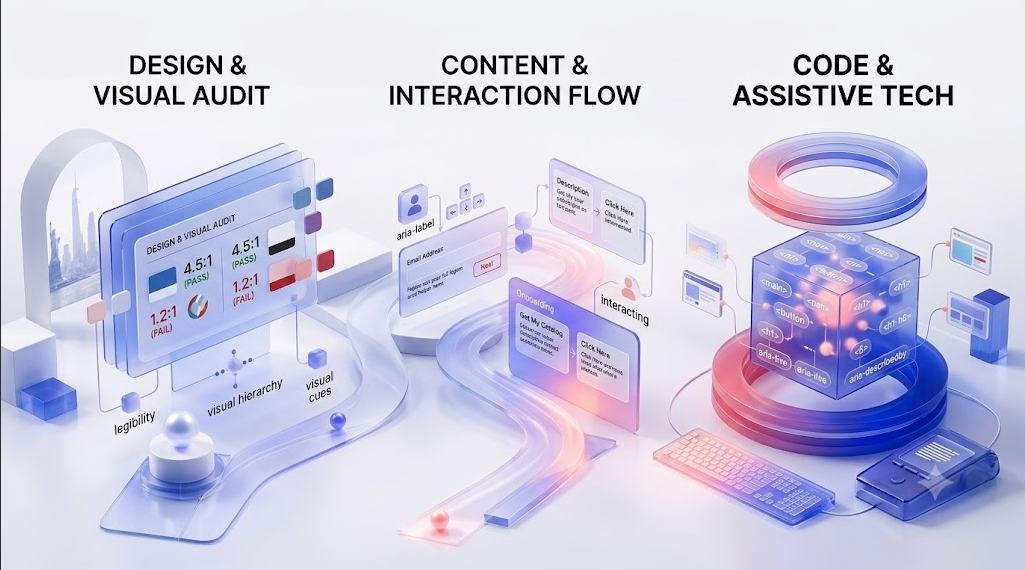
A successful WCAG accessibility audit is not just a job for the developers at the end of a project. It requires a multidisciplinary approach, covering three core pillars:
- Design and Visual Accessibility: Evaluating color contrast, typography, spacing, visual cues, and the overall layout logic to ensure legibility for users with visual impairments or color blindness.
- Content and Interaction Accessibility: Reviewing the structure of the copy, the clarity of instructions, readability levels, and the inclusion of alternative text for media.
- Front-End Code and Assistive Technology Support: Inspecting the HTML/CSS/JavaScript to ensure semantic markup, proper ARIA (Accessible Rich Internet Applications) attributes, and flawless communication with screen readers and keyboard-only navigation.
Website Accessibility Audit Checklist
Whether you are designing a new feature or auditing an existing site, use this detailed web accessibility checklist to ensure you meet WCAG standards:
1. Page Structure, Headings, and Landmarks
- Sequential Headings: Are heading tags (
<h1>through<h6>) used in a logical, nested order without skipping levels? - Landmarks: Are HTML5 landmarks (
<header>,<nav>,<main>,<footer>) properly implemented so screen reader users can jump to specific sections? - Single H1: Does every page have one (and only one) descriptive
<h1>tag?
2. Keyboard Navigation and Visible Focus
- Keyboard Operability: Can all interactive elements (links, buttons, form fields, dropdowns) be accessed and operated using only the
Tab,Enter,Spacebar, and arrow keys? - Visible Focus States: Does every interactive element have a highly visible focus indicator (like an outline) when navigated via keyboard?
- No Keyboard Traps: Can a user navigate away from every element they navigate to without getting stuck?
3. Colour Contrast and Non-Colour Visual Cues
- Contrast Ratio: Do standard text and images of text have a contrast ratio of at least 4.5:1 against their background (or 3:1 for large text)?
- Information Beyond Color: Are you relying solely on color to convey meaning? (e.g., Error states should use an icon or text label in addition to turning red).
4. Images, Alternative Text, and Media Captions
- Alt Text: Do all meaningful images have descriptive
altattributes? - Decorative Images: Do purely decorative images have empty alt attributes (
alt="") so screen readers can safely ignore them? - Video and Audio: Are accurate captions provided for all pre-recorded videos? Are transcripts available for audio-only content like podcasts?
5. Forms, Labels, Instructions, and Error Messages
- Associated Labels: Is every form input explicitly associated with a
<label>element in the code? - Clear Instructions: Are required fields clearly marked with text (not just an asterisk)?
- Accessible Errors: When a user makes a mistake, is the error described in text, and is the user’s focus directed to the field that needs fixing?
6. Links, Buttons, and Interactive Components
- Descriptive Links: Does the link text make sense out of context? (Avoid vague phrases like “Click Here” or “Read More”).
- Buttons vs. Links: Are
<button>tags used for actions (like submitting a form or opening a modal), and<a>tags used for navigation (going to a new page)?
7. Responsive Layout, Zoom, and Motion
- Text Zoom: Can users zoom the page text up to 200% without breaking the layout or losing functionality?
- Responsive Reflow: Does the site adapt to mobile screens without requiring horizontal scrolling?
- Reduced Motion: Do you respect the
prefers-reduced-motionmedia query by disabling auto-playing videos and severe parallax animations for users with vestibular disorders?
8. Dynamic Content and Screen Reader Feedback
- ARIA Live Regions: If content updates dynamically on the screen (e.g., a notification banner appears or a shopping cart number increases), is a screen reader alerted to this change?
- Modal Focus: When a pop-up modal opens, does the keyboard focus move into the modal, and does the background become hidden from screen readers?
Automated vs Manual Accessibility Testing
When executing website accessibility testing, teams often wonder if they can rely entirely on software. The short answer is no.
Automated Testing involves using software (like Lighthouse, axe DevTools, or WAVE) to scan your code. It is incredibly fast, highly scalable, and excellent for catching objective errors like missing alt text, skipped heading levels, or low color contrast. However, automated tools can only catch roughly 25% to 30% of all WCAG violations.
Manual Testing requires a human to evaluate the site. This involves navigating the site using only a keyboard, running through core user flows with a screen reader (like NVDA or VoiceOver), and assessing the context of images and link text. Manual testing is the only way to verify that an experience is actually usable, not just technically compliant.
How to Prioritize Accessibility Issues
Once your audit is complete, you will likely have a long list of issues. Do not panic. Use this step-by-step framework to prioritize remediation:
- Fix Task Blockers First: Identify Critical Blockers.
Start with issues that completely prevent a user from completing a core task. If a user cannot check out, submit a contact form, or log in because of a keyboard trap or missing label, these must be fixed immediately.
- Prioritize Key User Flows: Focus on High-Traffic Journeys.
Address issues on your highest-traffic pages (Home, Pricing, Contact) and the primary user journeys. A minor contrast issue on your checkout page is more important than a missing heading on an archived blog post from 2018.
- Update Reusable Components: Scale Your Fixes.
Fix issues within your global design system or site header/footer. By fixing an inaccessible navigation menu or a poorly coded button component, you will automatically resolve hundreds of errors across the entire site at once.
- Address Content and Media: Clean Up Content.
Finally, tackle ongoing content issues, such as writing descriptive alt text for older blog images, adding captions to legacy videos, and adjusting heading hierarchies on secondary pages.
What an Accessibility Audit Report Should Include
A professional audit report shouldn’t just be a spreadsheet of confusing code errors. It needs to be actionable for both stakeholders and developers. It should include:
- Executive Summary: A high-level overview of the site’s current accessibility status and risk level.
- Testing Methodology: The tools, screen readers, browsers, and specific WCAG level (e.g., WCAG 2.1 AA) used for testing.
- Detailed Issue Breakdown: A clear description of each issue, including the specific URL, component, and the user impact (why it matters).
- Remediation Guidance: Clear, code-level recommendations and design suggestions on how to fix the problem.
FAQs on Website Accessibility Audits
A comprehensive manual audit should be conducted annually, or whenever you launch a major redesign or new core feature. Automated testing should be integrated into your continuous integration (CI) pipeline and run with every code deployment.
No. Automated tools are vital, but they can only detect about 25-30% of accessibility issues. They cannot judge the context of an image’s alt text or determine if a complex interactive component actually makes logical sense to a screen reader user.
Accessibility testing ensures that people with disabilities can access and operate the interface. Usability testing assesses how intuitive, efficient, and user-friendly the interface is for the general target audience. Both are essential for a great user experience.
Both. Accessibility should start in the design phase (checking colors, typography, and layout). It should be tested during development (checking code semantics), and verified in a staging environment before launch.
It is a team effort. UX/UI designers address visual and structural barriers; content strategists handle language and media alternatives; developers implement semantic code and ARIA; and QA testers validate the final product using assistive technologies.
Conclusion
Conducting a thorough website accessibility audit is the most reliable way to ensure your digital products are usable by everyone, regardless of their abilities. By integrating this checklist into your standard workflows, you protect your business from legal risks, improve your overall SEO, and most importantly, deliver a fair and inclusive experience to all users.
Building an accessible digital ecosystem requires specialized knowledge across design and code. If your team needs expert guidance navigating WCAG standards, integrating inclusive design practices, or conducting a rigorous manual audit, explore how the UI/UX experts at Leo9 Studio can help you build better, more inclusive digital experiences.